
Test your assistant before customers do
The test panel on Assistant settings runs a real answer through the real pipeline without sending anything to WhatsApp — what it shares with a live conversation, and where it differs.
- Who
- Owners and admins
- Plan
- All plans
- Role
- Owner or Admin
- Takes
- A minute per question
Before you start
- Business information in your knowledge base, so there is something to answer from
The Test simulator sits on the Assistant settings page, next to the style controls. You type what a customer would type, and it produces the answer your assistant would produce — using your knowledge base, your tone settings and the same safety rules — without a message ever leaving OMAI.
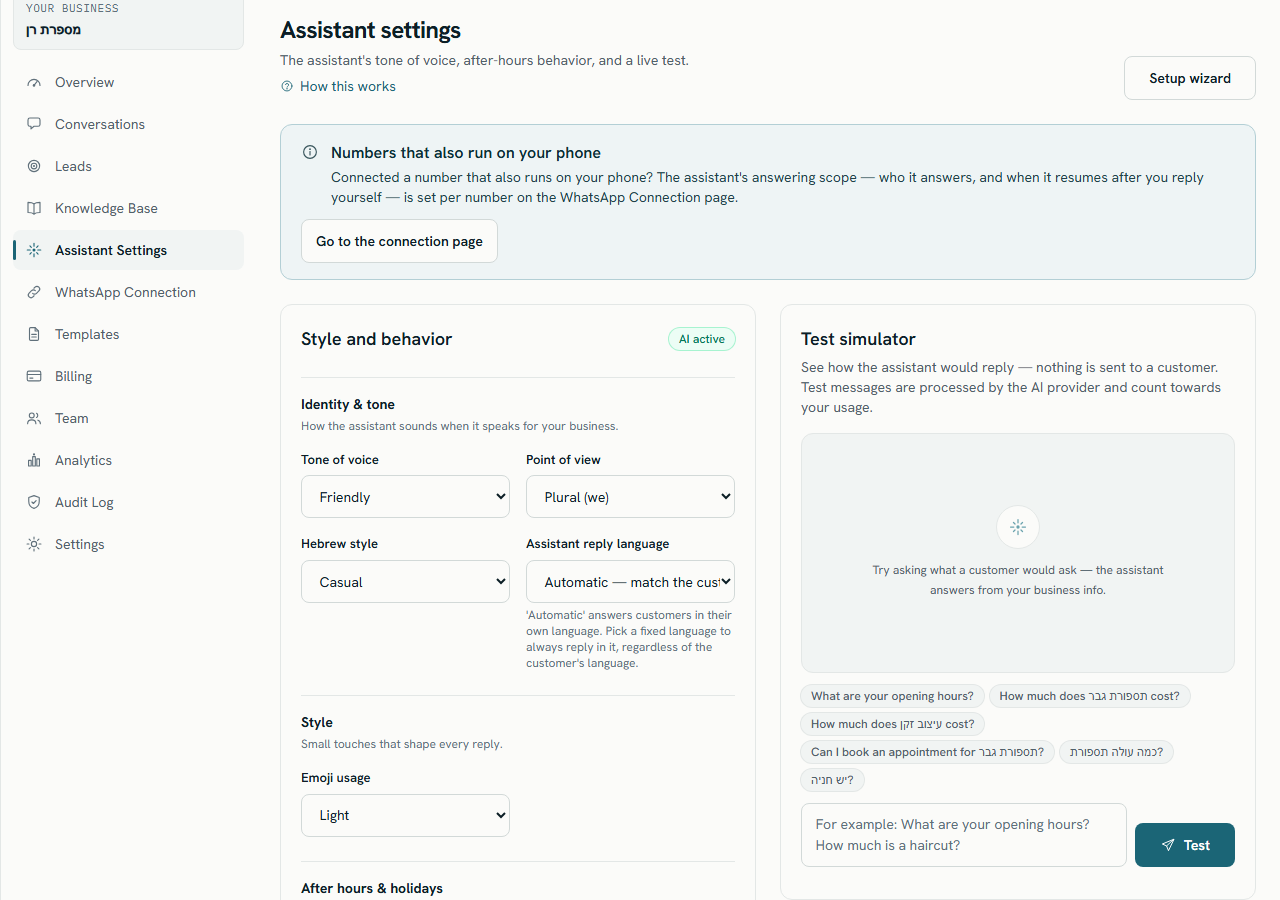
Who can use it
The panel needs the same permission as the assistant settings themselves, so an Owner or an Admin can use it and an Agent or a Viewer cannot. The same panel also appears inside the setup wizard, at the Test the assistant step, where it has an extra Mark step as tested button.
Run a test
Step 1 Open Assistant Settings from the sidebar and find the Test simulator card.
Step 2 Type a question into the message box, or click one of the suggested questions to load it.
- Press Enter to send. Use Shift+Enter for a new line inside the message.
Step 3 Press Test.
- Submitting an empty box shows Enter a test message. instead of running anything.
You should see: The button reads Running…, a typing indicator appears, and the answer arrives as a chat bubble labelled Assistant reply.
Step 4 Read the reply, then open Knowledge-base sources underneath it to see what the answer was built from.
You should see: Each source shows its title, a type tag such as FAQ, Service, Policy, Hours, Document or Website, and the first lines of the text.
Step 5 Ask a follow-up question, or press Clear chat to start again.
You should see: The panel empties. Nothing was stored, so there is nothing to delete afterwards.
What a reply shows you
- Language: … — the language the panel detected in your test message, one of Hebrew, English, Mixed or Other.
- Knowledge-base sources (n) — the pieces of business information retrieved for that question. When nothing was retrieved, no sources section is shown at all.
- Handed off to an agent — a badge shown when this message would be escalated instead of answered, with the Handoff reason and a note that a real conversation would go to a person. The text in the bubble is then the handover acknowledgement, not an answer.
Where the suggested questions come from
The chips above the message box are built from your own catalogue, not written by AI, and they are the same every time for the same data:
- One opening-hours question, always.
- One price question for each active service, using the service name.
- One booking question for the first of your services.
- Up to 2 of your FAQ questions, word for word as you wrote them.
- A “where are you located?” question, only when you have neither services nor FAQs yet.
- Duplicates are removed and at most 6 chips are shown.
What it shares with a live conversation
- Language detection and the reply-language rule from your settings.
- Your tone, point of view, emoji usage and business name.
- Whether your business is closed right now, and your after-hours message.
- The same search over your knowledge base, and the same instructions wrapped around it.
- The same AI model and the same sensitivity screening, handover rules and reply validation.
What it does not do
- Nothing is sent. No WhatsApp message is delivered, to you or to anyone else.
- Nothing is saved. No conversation, no message and no state change — clearing the chat is only clearing your screen.
- No conversation history. Each test is answered on its own, while a live reply also sees the last messages of that conversation.
- No pauses or per-number rules. The panel answers even when the assistant is paused, and it ignores the answering scope set on a coexistence number.
- A shorter answer budget. The panel allows a shorter generated reply than a live conversation does, so a long answer may be cut off here and not there.
Usage and billing
A test is a real request to the AI provider, so it costs real tokens and those are recorded against your organization. It is not billed as an AI answer: the plan’s allowance counts answers actually sent to customers, and a test message is not one of them.
Limits
| Limit | Value |
|---|---|
| Length of one test message | Up to 4,096 characters, enforced by the message box |
| Suggested questions shown | At most 6, including at most 2 taken from your FAQ |
| Knowledge pieces retrieved per test | Up to 5 |
| Reply length before it is rejected as too long | 900 characters |
| Tests per hour | Not limited separately — the plan allowance is the only gate |
The reply says nothing useful and shows no sources. What should I fix?
There was no matching business information. Add or correct the service, FAQ or document that should have answered it, then re-run the same question — see Test what the assistant can find.
Can my agents use the panel to practise?
No. It needs the assistant-settings permission, which only Owners and Admins have.
Do my test questions appear in the inbox or in reports?
No. They create no conversation and no message, so nothing about them shows up in the inbox, and reports on answers and handovers count live traffic only.
Should I also test from my own phone?
Yes, once your number is connected. The panel cannot cover message delivery, the 24-hour messaging window or the per-number rules on a coexistence number.