
Payment and subscription problems
A declined card, money taken with no plan change, a cancel button that will not appear, wrong details on an invoice, a charge after cancelling, and a usage meter that does not match what you counted.
- Who
- Owners and admins. Everyone on the team can open the billing screen and read it.
- Plan
- All plans, including the trial
- Role
- Owner or Admin to buy, cancel, resume or change payment details
Before you start
- Access to the **Billing** screen
- The date and amount of the charge you are asking about
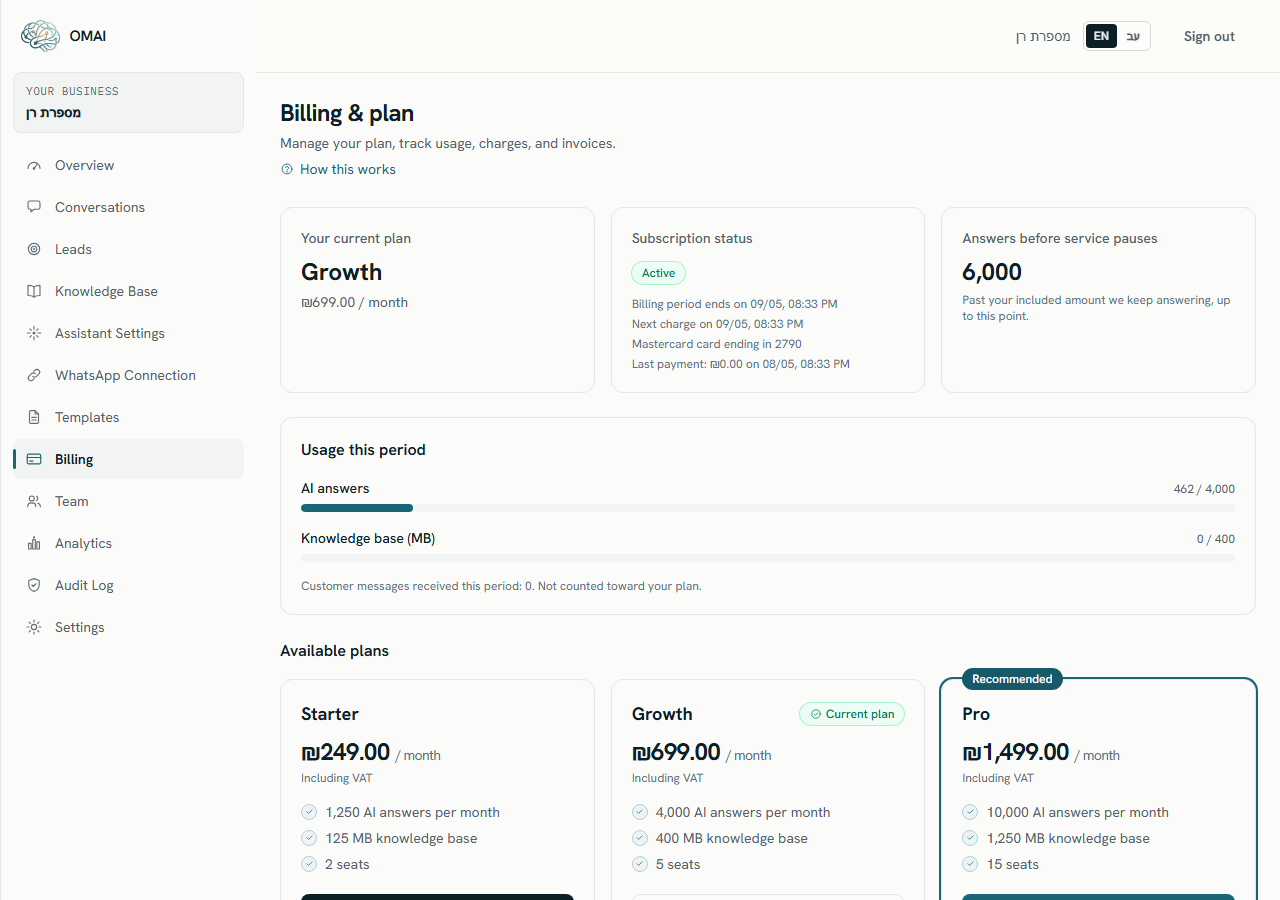
Almost every billing question is answered by three things on one screen: the Subscription status tile, the Usage this period meters, and the Invoices table. Open Billing from the dashboard menu and keep it in front of you while you read this — each symptom below names the exact tile or wording that tells you what happened.
Where to look before anything else
- Subscription status — the badge (Trial, Active, Past due, Unpaid, Canceled), the next charge date, and the card brand with its last four digits.
- Your current plan — the plan name and the monthly price as it appears on today’s price list.
- Answers before service pauses — the point at which AI answers stop for this period.
- Usage this period — the AI-answers meter and the knowledge-storage meter.
- Add-ons — one row per dedicated number rented through OMAI, each with its own monthly price. This card only appears when you have one.
- Invoices — every completed charge, newest first, up to 50 rows, with a View link when a document exists.
Paying, activating and cancelling
The payment page refuses the card — The payment didn’t go through.
Likely causes
- The bank refused the charge: a spending limit, a block on recurring or online charges, or a 3-D Secure step that was not completed.
- The card cannot be charged again at all. The screen then says the card can’t be charged again and offers no retry.
- The payment page was closed part-way through.
- The name or mobile number on the Almost there page does not match what the bank expects.
What to do
- Read the wording. The payment didn’t go through means no money was taken — you can simply try again.
- Go back to Available plans, choose the plan and complete the checkout once more.
- If the card cannot be retried, choose Update payment method and add a different card.
- Ask the bank to approve a monthly recurring charge from an Israeli payment provider, then retry.
- On the Almost there page check Full name (first and last name) and Mobile number.
How to check it worked
You reach Payment received — you’re all set! and the Subscription status tile shows Active.
When to contact us
If two different cards are refused, write to us with the plan you chose, the exact wording on screen and the time. Never send card numbers — we do not need them.
Money left your account but the plan is unchanged.
Likely causes
- The confirmation from the payment provider has not reached us yet. The success page re-checks by itself every few seconds.
- You closed the page before the confirmation arrived. It still arrives on its own; the page was only watching.
- The amount you are looking at is the ₪1 card verification, not a plan payment.
- The payment was made from a different account or organization than the one you are looking at now.
What to do
- Leave Confirming your payment… open. After about 3 minutes it changes to Still waiting for the payment confirmation with a Check again button.
- Reload Billing and read Subscription status and Invoices — an activated plan always writes an invoice row.
- Check the amount on your statement. ₪1 is a card verification, not a subscription charge.
- Confirm you are signed in to the organization that paid.
How to check it worked
Subscription status shows Active with a period end date, and a new row appears in Invoices.
When to contact us
If the money is gone and 30 minutes later nothing has changed, write to us with the amount, the date and time, and the approval or reference number from your statement. Payments that arrive without matching a subscription are queued for a person to settle by hand.
There is no way to cancel — the Cancel subscription card is not there.
Likely causes
- You are on the trial. A trial shows End your free trial instead, because there is nothing to cancel and nothing has been charged.
- The subscription is Past due or Unpaid. The cancel card is only offered while the status is Active.
- The cancellation is already scheduled. The page then shows Your subscription is set to cancel with a Keep my subscription button.
- Your role is not Owner or Admin. The plan, the usage and the invoices stay readable for every role, but the controls that change a subscription are not shown to the others — a note at the top of the page says so.
What to do
- On a trial, choose End trial. Your organization, conversations and knowledge base are kept.
- If a payment is outstanding, settle it first with Update payment method, or write to us.
- If the strip already says the cancellation is scheduled, nothing further is needed — the date on the strip is when the plan stops.
- Ask an owner or admin to do it.
- If you see We couldn’t update your subscription, reload the page and try once more.
How to check it worked
The page shows Your subscription is set to cancel and names the date the plan runs to.
When to contact us
If the button refuses twice — a red banner saying your subscription was not changed — write to us with your organization name, the words on the banner, and what the Subscription status tile said at the time.
Charges, invoices and usage
The invoice carries the wrong name, address or amount.
Likely causes
- The billing name, mobile number and invoice email are whatever was typed on the Almost there page at checkout, and nothing has changed them since.
- The amount differs from the plan card because you joined on an earlier price list. The card shows today’s price; the charge follows the price stored on your subscription.
- The business country on the account is wrong. Country decides the currency and how tax is shown, and it cannot be changed from the dashboard.
- The document has already been issued to the tax authority, so it cannot be edited in place.
What to do
- Choose Update payment method, correct Full name, Mobile number and Email for invoices (optional), then continue. The details are saved as part of that step.
- Compare the amount with the Invoices table rather than with the plan card — the table is what you were actually charged.
- For a document that has already been issued, write to us with its date and amount. A correction is made by issuing a credit document, not by editing the original.
- To change the business country, write to us — it affects currency and tax and is handled by hand.
How to check it worked
The next invoice, and the address in An invoice is on its way to {email} on the payment-confirmation screen, both carry the corrected details.
When to contact us
Send the invoice date, the amount, and exactly which field is wrong and what it should say.
You were charged after cancelling.
Likely causes
- Cancellation takes effect at the end of the period you have already paid for, so the charge you are looking at is the one that opened that period.
- A dedicated number rented through OMAI is billed as its own monthly add-on and keeps renewing until you release the number.
- The amount is the ₪1 card verification from updating a card.
- The cancellation was undone with Keep my subscription.
- A second organization is paying with the same card.
What to do
- Read Billing period ends on {date} in the Subscription status tile — that date is what you have paid for.
- Open the Add-ons card and check for rented numbers. Releasing a number from the WhatsApp screen stops its future charges immediately; the rest of the paid month is not refunded.
- Open the row in Invoices to see what each charge covers.
- Confirm the strip does not read Your subscription is set to cancel with a resume button — if the resume button was pressed, the plan is live again.
How to check it worked
No new row appears in Invoices after the period end date shown on the status tile.
When to contact us
If a charge lands after the period ended, write to us with the amount and the date. Refunds are handled by us on request; there is no refund button in the dashboard.
The AI answers meter does not match what you counted.
Likely causes
- The meter counts AI answers only: one per assistant reply that WhatsApp accepted, and at most one per incoming customer message.
- Messages your team writes by hand, messages customers send you, and messages you send in the assistant test panel are not counted.
- The meter follows your billing period, not the calendar month.
- If extra capacity has been granted to your account, the meter still shows the plan’s own allowance — so it can read past 100% while the assistant is still answering normally.
What to do
- Read the line under the meters: Customer messages received this period: {count}. Not counted toward your plan. That number is inbound traffic, not billed answers.
- Compare the meter with the Answers before service pauses tile — that tile is the point where AI answers actually stop.
- Check the period dates on the Subscription status tile before comparing with your own records.
- If the meter says you are at the limit but the assistant is still replying, extra capacity is in place — that is expected, not a fault.
How to check it worked
The meter moves by one for each new AI reply that a customer receives, and stops moving when the assistant stops replying.
When to contact us
Write to us with the period dates, the number you expected, and whether AI replies are actually stopping.
What you can do yourself, and what we do for you
| Action | Who does it |
|---|---|
| Open Billing, read invoices and usage | Every role on the team |
| Buy a plan or switch plan | Owner or Admin |
| Cancel, resume, or end a trial | Owner or Admin |
| Update the saved card and the billing contact | Owner or Admin |
| Refund a payment | Write to us — no refund control exists in the dashboard |
| Correct a tax document that has already been issued | Write to us — we issue a credit document |
| Change the business country on the account | Write to us |
| Grant extra AI-answer capacity | Write to us |
What to send us
- The organization name as it appears in OMAI.
- The amount and currency, and the date and time of the charge.
- The approval or reference number your bank or card statement shows. Never the card number.
- What the Subscription status tile says right now, word for word.
- The exact wording of any red banner on the billing page.
If I press pay twice, am I charged twice?
A billing period can only be claimed once, so a repeated renewal cannot take a second payment. If two checkouts for the same plan are completed within 24 hours, the second payment is held rather than applied and a person decides between a refund and a credit.
Why does the plan card show a different price to my invoice?
The plan cards always show today’s price list. Your subscription keeps the price list you joined on, and that is what is charged. The Invoices table is the reliable record.
Does cancelling delete my data?
No. Your organization, conversations, knowledge base and team are kept. Deleting data is a separate request under Settings → Account & privacy.
Can I get a refund from the dashboard?
No. Refunds are made by us on request, and a credit document is issued for each one. Write to us with the amount and the date.
What happens to customer messages while a payment is outstanding?
They keep arriving and are stored. Your team can keep replying by hand. Only AI answers stop, and only once the retries for the charge have run out — the sequence is set out in Failed payments and renewals.