
Meta, WABA, numbers and OMAI: how they fit together
The four layers behind a WhatsApp connection — Meta Business account, WhatsApp Business Account, phone number and the app subscribed to it — and where each one shows up in OMAI.
- Who
- Owners and admins
- Plan
- All plans
- Role
- Anyone signed in can read the connection; Owner or Admin to change it
Almost every WhatsApp error message assumes you know this model. “The number is registered to a business app”, “your connection needs attention”, “this number needs to move to connect” — each of them is about one specific layer. Ten minutes here saves an hour later.
The four layers
A working connection is four things stacked on top of each other. Each one is created before the next, and each one is owned by someone different.
- Meta Business account — your business, as Meta knows it. Owned by you.
- WhatsApp Business Account (WABA) — created under that business, for WhatsApp specifically. Owned by the business.
- Phone number — added under the WABA and verified with Meta. Owned by whoever holds the line.
- The app subscribed to the WABA — OMAI, receiving your messages from Meta. Owned by OMAI, permitted by you.
Meta Business account
The account that represents your business at Meta. People get roles on it, and Meta requires the person connecting WhatsApp to be an Admin. You pick it — or create it — inside Meta’s connect window; OMAI never shows it afterwards. It is the layer that decides *who at your company may administer WhatsApp*.
WhatsApp Business Account (WABA)
The container Meta creates for your WhatsApp presence: the display name customers see, the messaging limits Meta grants you, the quality rating it keeps on you, and the phone numbers underneath it. A WABA belongs to one Meta Business account and cannot be moved to a different one later, which is why the connect window asks you to choose the business deliberately.
The phone number and its phone number ID
The number your customers write to sits under the WABA. Meta also gives it an internal identifier — the phone number ID. Every message OMAI sends or receives is addressed by that id rather than by the number itself, so the id is what you quote to support when something is wrong with one specific number.
The app subscribed to the WABA
Meta only delivers incoming messages to an app that is subscribed to your WABA. During the connect flow OMAI subscribes itself. This layer is invisible in the product and impossible to miss when it is absent: without it, customers can message the number and nothing arrives in Conversations.
The access token, and why it expires
When you finish the connect window, Meta issues OMAI a credential — an access token — scoped to your WhatsApp Business Account. It is what lets OMAI send on your behalf and read what arrives. It is stored in our secrets store and is never shown in the dashboard.
That token is time-limited: the ones issued through the connect flow last 60 days. OMAI renews them in the background, starting 14 days before expiry. If three renewal attempts in a row fail, or the token has already expired, the connection moves to Action required and the WhatsApp screen shows the banner Your WhatsApp connection needs attention.
What “registered to a business app” means
Before a number can send through the WhatsApp Business Platform, Meta has to have it *registered* to a business app. A number is not registered in several places at once, which is why the same phone number cannot be freshly registered while it is active somewhere else. What OMAI does depends on the case:
- The number is not on WhatsApp. OMAI registers it once and secures it with a two-step verification PIN on your behalf. It never retries automatically, because Meta allows only a limited number of registration attempts per 72 hours.
- The number is on the WhatsApp Business app. Registration already happened on the phone, so OMAI does not register and never removes the number from the app.
- The number is registered to another provider’s app. That provider has to release it first. Until they do, Meta will not let it move.
When registration fails, the reason is shown on the connection card in plain language — for example Reset the two-step verification PIN in WhatsApp Manager, then reconnect the number. Meta error messages and what to do about them lists the rest.
Where each term shows up in OMAI
| Term | What it is | Where you see it |
|---|---|---|
| Meta Business account | Your business at Meta. Holds the WABA and the people who may administer it. | Chosen or created inside Meta’s window. OMAI does not display it. |
| WhatsApp Business Account (WABA) | The WhatsApp container: display name, messaging limits, quality rating, numbers. | Technical details on the connection card, as waba_id. |
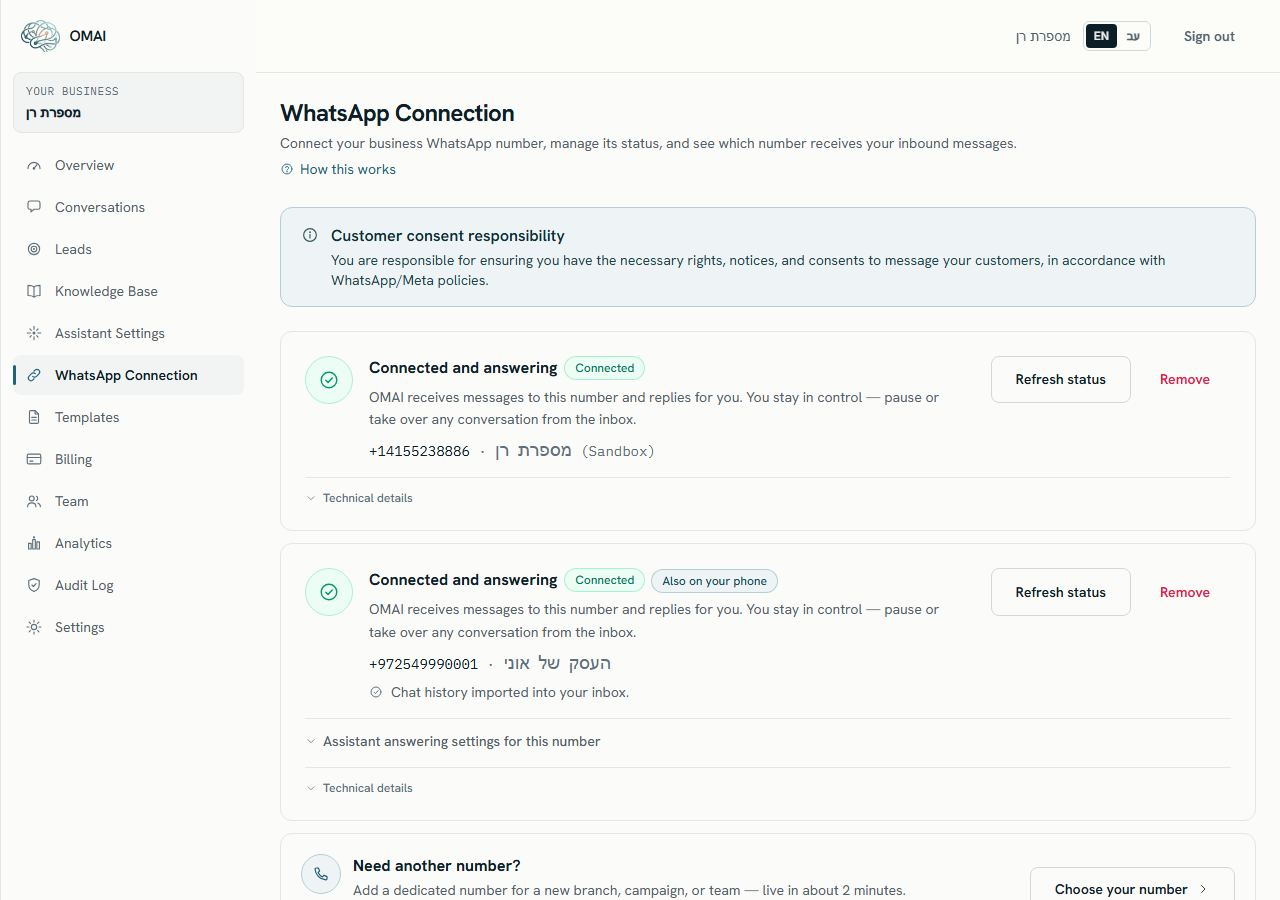
| Phone number | The number customers message. | On the connection card, in international format. |
| Phone number ID | Meta’s internal id for that number. | Technical details on the connection card, as phone_number_id. |
| Display name | The business name Meta shows next to your number. Meta approves it. | Next to the phone number on the connection card, once Meta returns it. |
| Access token | The time-limited credential OMAI uses on your behalf. | Never displayed. Its expiry is what turns the card to Action required. |
| App subscription | OMAI subscribed to your WABA so Meta delivers messages to it. | Not displayed. It is what makes a customer message appear in Conversations. |
| Connection status | OMAI’s own record of the state of the link. | The badge on the card: Connected, Pending verification, Action required, Disconnected or Not connected. |
Who can see and change what
Inside OMAI, any signed-in member of your organization can open WhatsApp Connection and read the connection, including the ids under Technical details. Connecting, refreshing and removing a number require the Owner or Admin role.
On Meta’s side, everyone with a role on your Meta Business account can see the WABA in WhatsApp Manager, together with its display name, messaging limits and quality rating. That list is managed by you at Meta, not by OMAI.
Can I move my WABA to a different business later?
No. A WhatsApp Business Account cannot be moved to a different Meta Business account after it is created, so choose the business carefully in the connect window.
Who owns the phone number?
A number you bring stays yours — disconnecting from OMAI does not take it away. A number rented through OMAI belongs to the rental: releasing it stops the monthly charges immediately, the rest of the paid month is not refunded, and the number returns to the general pool.
If I disconnect in OMAI, is the number disconnected at Meta too?
Not on the path that keeps the number on your phone. Removing the connection here stops the assistant and the inbox; the number stays connected to Meta’s Business Platform until you also disconnect on the phone, under Settings › Account › Business Platform › Disconnect.
Do I need my own Meta developer app or API key?
No. OMAI is the app subscribed to your WABA. You never create an app, an API key or a webhook — the connect window sets that up for you.