
Reconnect, disconnect and remove a number
The three things you can do to a connected number — refresh, reconnect, disconnect — what each one changes the moment you press it, what happens to conversations already in progress, and which of them you cannot undo.
- Who
- Owners and admins
- Plan
- All plans
- Role
- Owner or Admin
Before you start
- A number already connected on the WhatsApp Connection screen
All three management actions live on the number’s card on Dashboard → WhatsApp Connection. Two of them are buttons on the card itself; the third — reconnecting — is the same connect flow you used the first time. This article says exactly what each one does at the moment you press it.
The three actions at a glance
| Action | Where it is | What happens immediately | Can you undo it? |
|---|---|---|---|
| Refresh status | Button on the number’s card | OMAI asks Meta for the number’s current state and stores the answer. Nothing about your setup changes. | Nothing to undo — it only reads. |
| Reconnect | The connect card on the same screen | You sign in to Meta again and pick the same number. The stored credential is replaced with a fresh one and the card returns to Connected. | Yes — you can reconnect as often as you need. |
| Remove | Button on the number’s card, behind a confirmation dialog | The connection record is deleted. The assistant stops answering on that number and new messages stop reaching your inbox. | Partly. You can connect the number again — but a number rented from OMAI is released and cannot be reclaimed. |
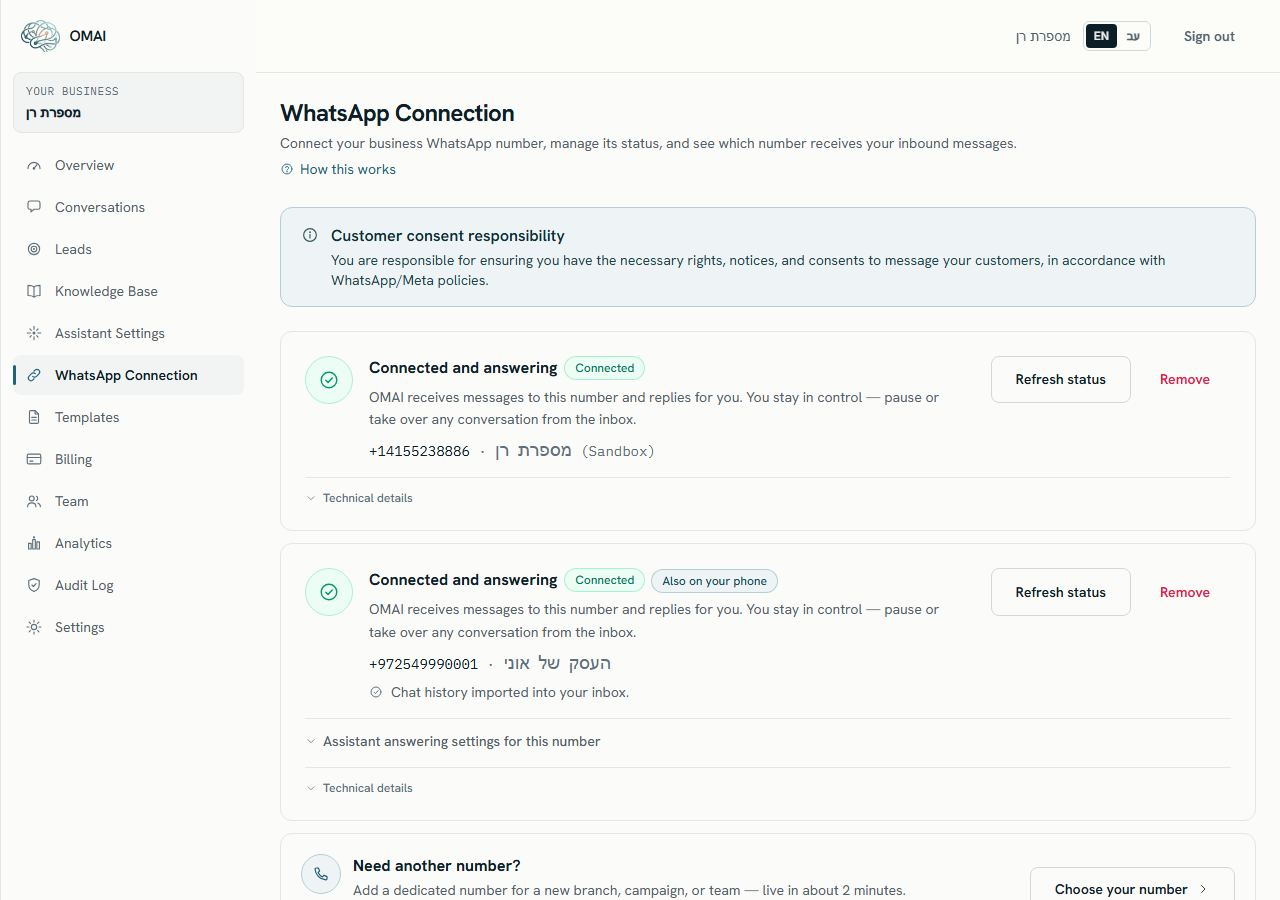
Refresh status
Use Refresh status when a number is stuck on Pending verification, or after you have fixed something on Meta’s side. It re-reads Meta’s view of the number and stores it, so the badge can move up or down. It cannot repair an expired connection — that always needs a reconnect. What the resulting badges mean is covered in connection states and what each one means.
Reconnect a number
Reconnecting is not a separate button: you run the connect flow again for the same number. Do it when the card asks you to reconnect, after Meta has expired the connection, or after someone disconnected the business platform from the phone app.
Reconnect
Step 1 Open Dashboard → WhatsApp Connection.
You should see: If the connection expired, a banner reads Your WhatsApp connection needs attention and a connect card appears directly beneath it.
Step 2 Press the connect button on that card and sign in with the Facebook account that manages the business.
- A blocked pop-up is the most common failure. Allow pop-ups for this site and press the button again.
You should see: Meta’s secure window opens. OMAI never sees your Meta password.
Step 3 Choose the same business and the same number as before, and finish Meta’s steps.
You should see: The card returns to Connected and the banner disappears.
- Conversations, messages, tags, notes and assistant settings are untouched — reconnecting is a credential change, not a reset.
- The previous credential is retired the moment the new one is stored, so the old one stops working immediately.
- For a number that also runs on your phone, your choice of who the assistant answers, and the quiet-hours value, stay as you set them.
- If the number is connected to a different account, Meta’s window will still open, but OMAI refuses the result with
This number is already connected to another organization.
Disconnect and remove a number
Remove a connection
Step 1 On the number’s card, press Remove.
You should see: A dialog opens, headed Disconnect this number?.
Step 2 Read the dialog body — it changes with the kind of number, and adds a sentence for rented and phone-connected numbers.
Step 3 Press Disconnect to confirm.
You should see: The card disappears from the screen. Nothing is scheduled and nothing is delayed — the change is immediate.
- Kept: every conversation, message, attachment, tag, note and lead, plus your assistant settings and knowledge.
- Stopped: inbound messages to that number are no longer accepted, so they do not appear in the inbox at all — there is no queue that fills up and drains later.
- Stopped: outbound sending from that number, including anything the assistant would have replied.
- Not recalled: a message WhatsApp already accepted before you disconnected is still delivered.
If the number is rented from OMAI
For a number you bought through OMAI, the confirmation dialog adds one more sentence: “This number is rented from us: releasing it stops the monthly charges immediately, the rest of the paid month is not refunded, and the number returns to the general pool.” Releasing happens before the record is deleted, and it is the one part of this that cannot be reversed — once the number is back in the pool it may be taken by someone else. Managing rented numbers on their own screen is covered in managing your numbers.
If the number also runs on your phone
For a number that stays live in the WhatsApp Business app, the dialog adds: “Note: removing here only stops the assistant and the inbox. The number stays connected to Meta’s Business Platform until you also disconnect on your phone: Settings › Account › Business Platform › Disconnect.” Removing the card here never touches the phone, and OMAI never de-registers such a number — you keep using WhatsApp on the phone exactly as before.
The reverse also happens. If someone disconnects the business platform in the app first, Meta tells OMAI, and the card moves to Action required with the line “The number was disconnected via the phone app.” The card stays on the screen until you either reconnect or remove it.
Conversations that were already open
- Open conversations stay in the inbox and stay readable. Nothing is archived or deleted by a disconnect.
- A customer who writes to the removed number gets no reply, and their message is not stored — so you cannot catch up on it later.
- If your organization still has exactly one other connected number, replies typed into an old conversation leave from that number.
- If you have no other connected number, sending is refused with
This WhatsApp number isn’t connected. Reconnect it before sending. - If you have two or more other numbers, OMAI refuses the reply rather than guess which number the conversation belonged to.
Connecting the same number again later
Run the connect flow from the same screen. Meta treats it as a new setup and OMAI creates a new connection record, so the number gets a fresh card. Your history is still there, because conversations were never tied to the record you deleted — they simply follow the reply rules above until the new number is the one they leave from.
Is there a way to stop the assistant without disconnecting?
Yes, and it is the better tool for a pause. Pause the assistant for one conversation or for the whole account — see pausing and resuming the assistant. Messages keep arriving in the inbox while it is paused.
Does removing a number cancel my subscription?
No. The plan and its billing are separate from the connection. A number rented from OMAI is the exception: releasing it stops that number’s monthly charge immediately.
Can I move a number from one OMAI account to another?
Not by yourself. Disconnect it on the first account, then run the connect flow on the second. While the first account still holds it, the second is refused with This number is already connected to another organization.