
What counts as an AI answer
Your plan is sold in AI answers. This is the exact definition of the billed unit — what increases the counter, what does not, when it resets, and what happens as you approach and pass your limit.
- Who
- Owners, admins and anyone watching the usage meter
- Plan
- All plans
- Role
- Any signed-in member can read the usage meter
Before you start
- A connected WhatsApp number, so the assistant can answer at all
Every OMAI plan is sold on one metered unit: the AI answer. Nothing else in the product is metered against your plan — not conversations, not contacts, not the messages your team sends by hand. This article defines the unit precisely, because the number in the meter is the number that decides when your assistant stops answering.
The billed unit
One AI answer is one reply the assistant sends to a customer on WhatsApp that the messaging provider accepted. Two rules make it exact. First, a customer’s incoming message can produce at most one AI answer — a retried or redelivered job never sends or counts a second reply for the same message. Second, the unit is counted at the moment the provider accepts the outgoing message, not when the answer is generated.
That second rule is why work that fails is free. If the assistant hands the conversation to a person, if the reply is suppressed, if the 24-hour WhatsApp session window closed while the answer was being written, or if the provider rejects the send, the reserved capacity is returned and nothing is counted.
What increases the counter
- A reply your assistant sends to a customer on WhatsApp, once the messaging provider accepts it.
- At most one such reply per incoming customer message — and that is the whole list.
What does not count
- Incoming customer messages. They are received and stored no matter what your usage is, and they are never limited or dropped. The billing page states the figure separately, as “Customer messages received this period”, and labels it as not counted toward your plan.
- Replies your team writes by hand from the inbox, including after a takeover.
- Messages you send in the test simulator on the Assistant Settings page. The simulator runs the same pipeline but never sends anything to WhatsApp, so it records no AI answer.
- Template messages your team sends outside the 24-hour window.
- Handover acknowledgements — when the assistant hands the conversation to a person instead of answering, no AI answer is counted.
- A reply the provider rejected. If the send fails, the capacity is returned.
When the counter resets
The counter is per billing period, and it starts again at zero when a new period opens. On a paid subscription the period is the month you paid for: the billing page shows its end under Subscription status as Billing period ends on a date, and a successful renewal opens the next period. Periods are calendar months with end-of-month clamping — a period that starts on the 31st ends on the 28th, 29th or 30th where the next month is shorter.
Before your first payment — during the trial — there is no paid period yet, so usage is counted from the first day of the current calendar month, in UTC. The same fallback applies to a subscription whose paid period has already run out.
Where to see your usage
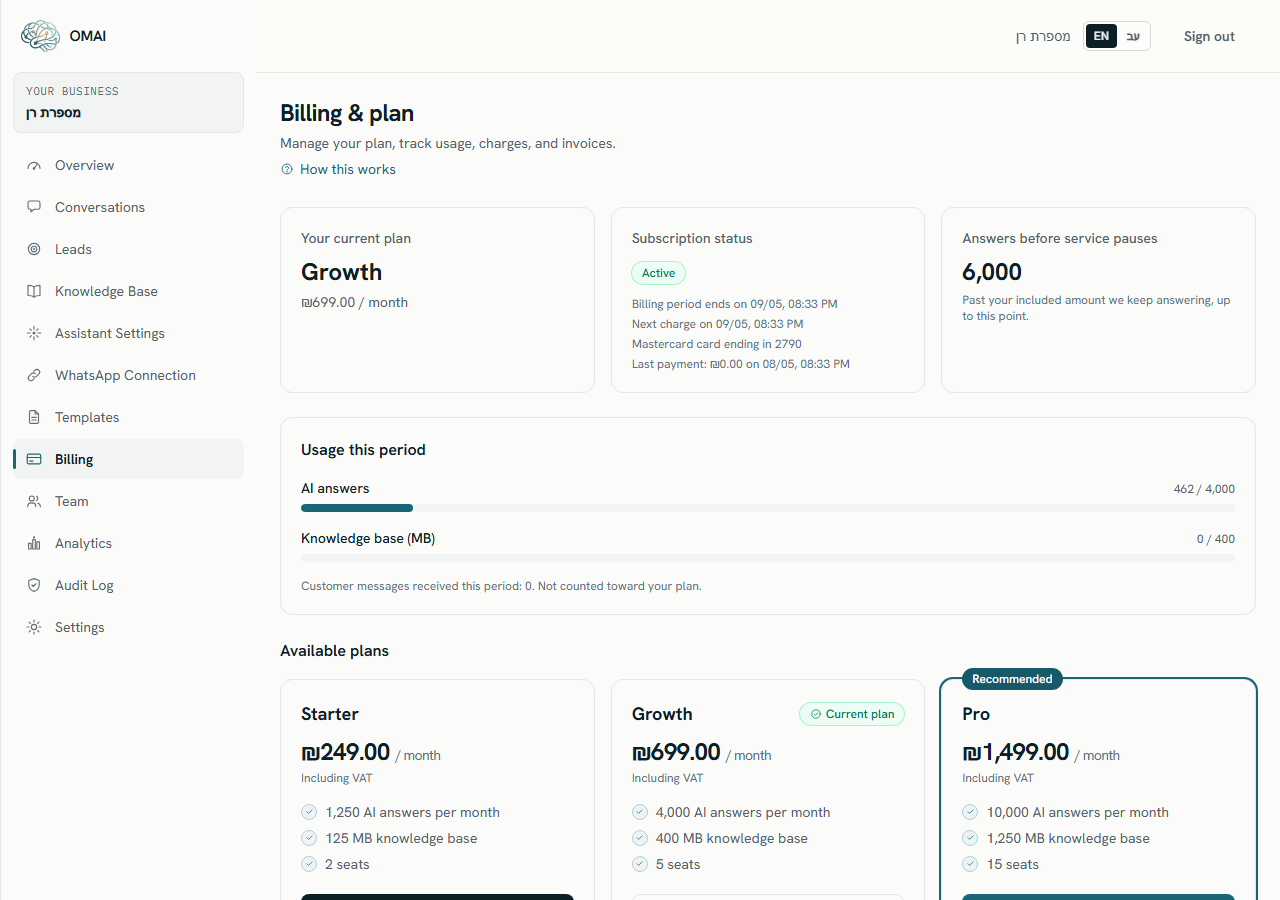
Step 1 Open Billing in the dashboard sidebar.
You should see: The Billing & plan page opens.
Step 2 Find the Usage this period card.
You should see: It shows an AI answers meter — answers used against the amount your plan includes — and a Knowledge base (MB) meter. Under them is the count of customer messages received this period, marked as not counted toward your plan.
Step 3 Read the Answers before service pauses tile at the top of the page.
You should see: This is the point at which the assistant stops answering on your plan: the included amount on Starter, or the fair-use ceiling on Growth and Pro.
As you approach the limit
OMAI warns you twice before anything stops, and once when it has. The warnings are measured against the amount your plan includes, not against the fair-use ceiling, so on Growth and Pro you see the 100% message while the assistant is still answering.
| What you see | When it appears | Assistant |
|---|---|---|
| Approaching your plan limit | 80% or more of the included AI answers are used. | Still answering |
| Plan limit reached for AI replies | 100% of the included AI answers are used, and the plan still allows answering in the fair-use band. | Still answering |
| AI replies are paused — plan limit reached | The stopping point for the plan has been reached. | Stopped |
The warnings appear in the alert strip at the top of every dashboard page and, in a longer form, on the billing page itself as You’re approaching your plan limits and You’ve reached your plan limit. The dashboard strip calls the metric “AI replies” where the billing page calls it AI answers — the two names count the same thing.
When you pass the limit
| Plan | Included | Past the included amount | Answering stops at |
|---|---|---|---|
| Starter | 1,250 | Answering stops immediately | 1,250 |
| Growth | 4,000 | Keeps answering, with no per-answer charge | 6,000 |
| Pro | 10,000 | Keeps answering, with no per-answer charge | 15,000 |
| Custom | Agreed per contract | Agreed per contract | Agreed per contract |
Once the stopping point is reached, the assistant stops answering — but the channel keeps working. Incoming customer messages are still received and stored, and each one is handed to your team so it waits in the inbox instead of disappearing. The dashboard says New customer messages are waiting in the inbox. Upgrade your plan, then resume the paused conversations from the inbox. Your team can read and reply to them by hand, and answering resumes on its own when the next billing period opens or when you move to a larger plan.
A customer sent five messages in a row. How many answers is that?
At most one AI answer per incoming message, so up to five — but only for the messages the assistant actually answered. Messages that ended in a handover, or that the assistant did not reply to, count nothing.
My meter says I have used more than my plan includes. Why is the assistant still answering?
You are on Growth or Pro, inside the fair-use band. Those plans keep answering past the included amount, up to half as much again, and stop there. The Answers before service pauses tile shows the exact stopping point.
Does taking over a conversation by hand save me answers?
Yes. Anything your team writes is not an AI answer, and while a conversation is paused for a human the assistant does not reply to it. See taking over a conversation.
Where can I see a list of every limit in the product?
In limits and quotas, which collects the plan allowances and the other enforced limits in one place.