
Workspace settings
Everything on the Business settings screen — business details, content language, timezone and the account and privacy controls — what each one affects, and who is allowed to change it.
- Who
- Owners and admins
- Plan
- All plans
- Role
- Owner or Admin for everything in this article. Agents and Viewers can open the same screen, but only for the settings that belong to their own account.
Before you start
- A signed-in account with the Owner or Admin role
A workspace is your business inside OMAI: its details, its opening hours, its knowledge, its WhatsApp connection, its team and its subscription. Dashboard → Settings is where the workspace-level choices live, under the heading Business settings. Everything you change there applies to everyone in the workspace, not just to you.
Where to find it
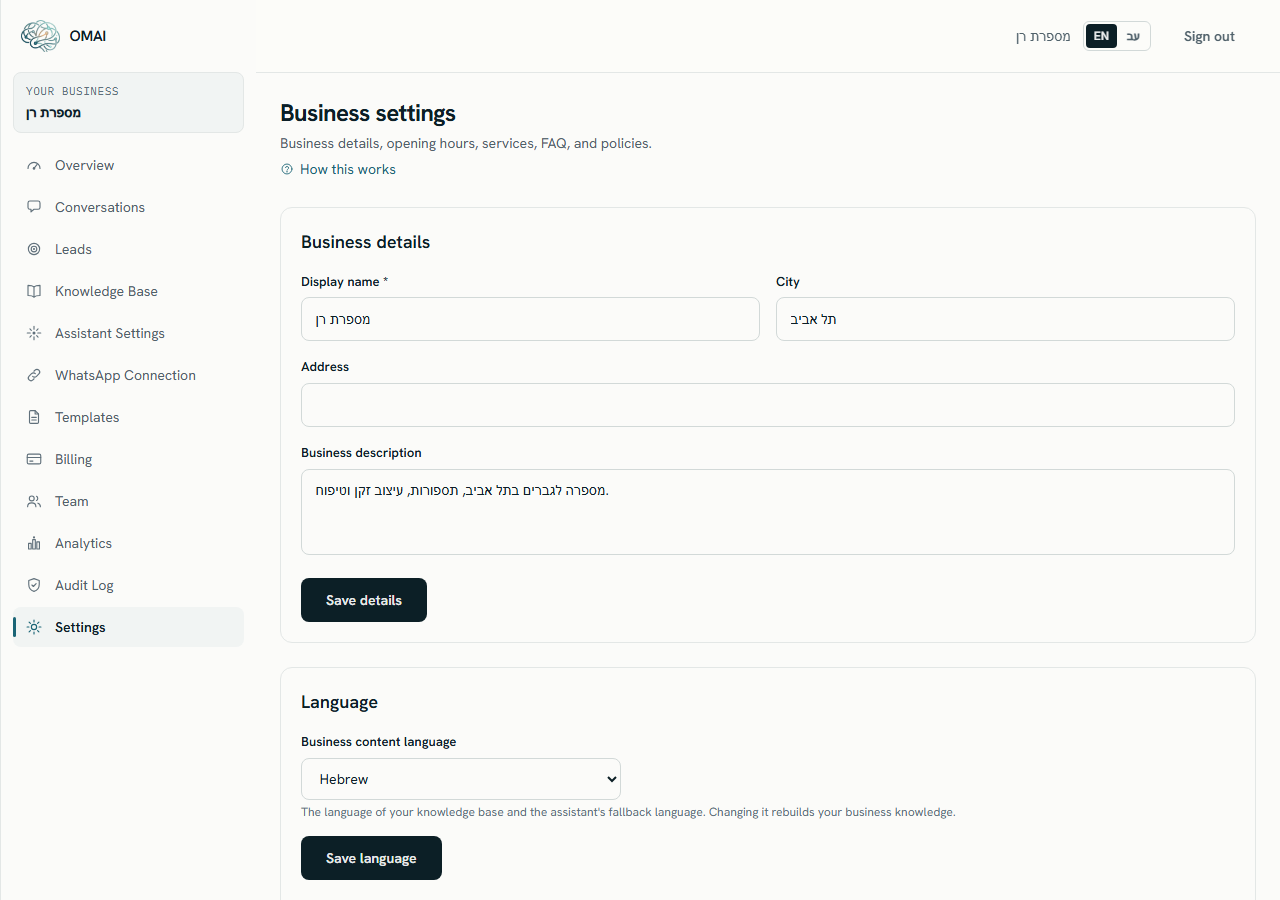
Business details
The first card holds how your business describes itself. The assistant uses these values when it talks about you, so they are worth getting right before you connect a number.
- Display name *TextRequired
- How your business is named in the assistant’s replies. It starts as the business name you typed when you signed up.
Up to 160 characters. The card refuses to save while it is empty.
- Business descriptionText area
- A short description of what you do. It becomes part of the business knowledge the assistant answers from.
Up to 2,000 characters.
- AddressText
- Your street address, used when a customer asks where you are.
Up to 300 characters.
- CityText
- The town or city, shown alongside the address.
Up to 120 characters.
Select Save details; the card answers “Details saved.” If anything is out of range the card answers “The business details are invalid.” and nothing is written. Your business profile covers how these values reach the assistant.
Language and timezone
- Business content languageDropdownRequired
- The language of your knowledge base and the assistant’s fallback language. Saving it rebuilds your business knowledge in the new language.
Default:
Hebrew for a business registered in Israel, English otherwise·Hebrew or English. - Business timezoneDropdownRequired
- Used for your opening hours, the assistant’s behaviour outside those hours, and the dates in reports.
Default:
Asia/Jerusalem for a business registered in Israel·Any timezone your browser knows. Anything else is refused as “Unsupported timezone.”
This is not the same as the language of your dashboard, and not the same as the language a given customer is answered in. Language sets the three apart.
The rest of the page
The cards below language are workspace settings too, and each has its own article:
- Opening hours — seven rows, one per day, plus special closures for holidays and vacations. See Opening hours.
- Services — what you offer, with prices and durations. The currency comes from your country and is not a field on the form. See Services and prices.
- FAQ — question-and-answer pairs the assistant can quote. See Frequently asked questions.
- Policies — cancellations, refunds, appointments, privacy or other, each with a title and a body of up to 8,000 characters.
Account & privacy
The last card on the page collects the settings that are not about how the business describes itself. Three of them belong to you personally rather than to the workspace, and they are the part of this screen every role can reach:
- Interface language — your own dashboard language. It is personal: changing it changes nothing for your colleagues.
- Password — change your own password here, without going through the reset email. If you sign in with Google there is no password to change, and the card says so instead of offering a form.
- Signed-in devices — every browser currently signed in to your account, with the one you are using marked, and a way to sign a single device out or to sign out everything except this one. It is where a lost or borrowed device is dealt with.
- Export your data — Export data (JSON) downloads a copy of the workspace’s data as a single file. It is generated while you wait, with no link and no email, and any Admin or Owner can take one.
- Delete account — requests deletion of the whole workspace. Only an Owner can submit it. Read Delete your account or workspace before you go near it.
What you cannot change here
| Setting | Where it came from | How to change it |
|---|---|---|
| Workspace name | The business name you typed at sign-up. It is what the sidebar and the page header show. | Not editable in the dashboard — write to us. Editing Display name changes what the assistant says, not this. |
| Country | Chosen at sign-up. The Hebrew sign-up form does not ask and records Israel. | Not editable in the dashboard, because it decides the billing currency of an existing subscription — write to us. |
| Billing currency | Derived from the country: shekels for Israel, euros in the eurozone, dollars elsewhere. | Follows the country, so it changes only when we change the country for you. |
| Legal name, industry, website, business phone | Fields that exist on the workspace record but have no form in the dashboard. | Not exposed. Put anything a customer might ask about into the business description or the FAQ instead. |
Who can change what
| Setting | Viewer | Agent | Admin | Owner |
|---|---|---|---|---|
| Open the Settings screen | ✓ | ✓ | ✓ | ✓ |
| See or change any of the business cards on it | — | — | ✓ | ✓ |
| Business details, language, timezone | — | — | ✓ | ✓ |
| Opening hours, services, FAQ, policies | — | — | ✓ | ✓ |
| Export the workspace data | — | — | ✓ | ✓ |
| Request deletion of the workspace | — | — | — | ✓ |
| Interface language (their own) | ✓ | ✓ | ✓ | ✓ |
| Their own password, and the devices signed in to their account | ✓ | ✓ | ✓ | ✓ |
The last two rows are the exception because they belong to the person rather than to the workspace — which is why an Agent and a Viewer still have a screen to open here. The interface language is also available from the language switch in the dashboard header, which every role can reach.
What is recorded
Saving business details, the content language or the timezone writes an entry to the audit log, and so does taking a data export. An Admin or an Owner can read the log on Dashboard → Audit Log.
Common questions
I changed the display name but the sidebar still shows the old business name.
Those are two different values. The sidebar and the header show the workspace name from sign-up, which the dashboard cannot edit; Display name is what the assistant uses when it talks to customers. Write to us if the workspace name itself is wrong.
Can I run two businesses from one workspace?
No. A workspace has one set of business details, one content language, one set of opening hours and one knowledge base. A second business needs a second workspace.
Why is my currency wrong?
The currency follows the country recorded at sign-up, and the Hebrew sign-up form records Israel without asking. Write to us with the correct country — it is not a self-service change because it affects an existing subscription.
Does changing the timezone move my opening hours?
The hours you typed stay as they are; they are simply read in the new timezone from that moment. Check the hours card afterwards to make sure they still describe when you are actually open.