
Plans and what is included
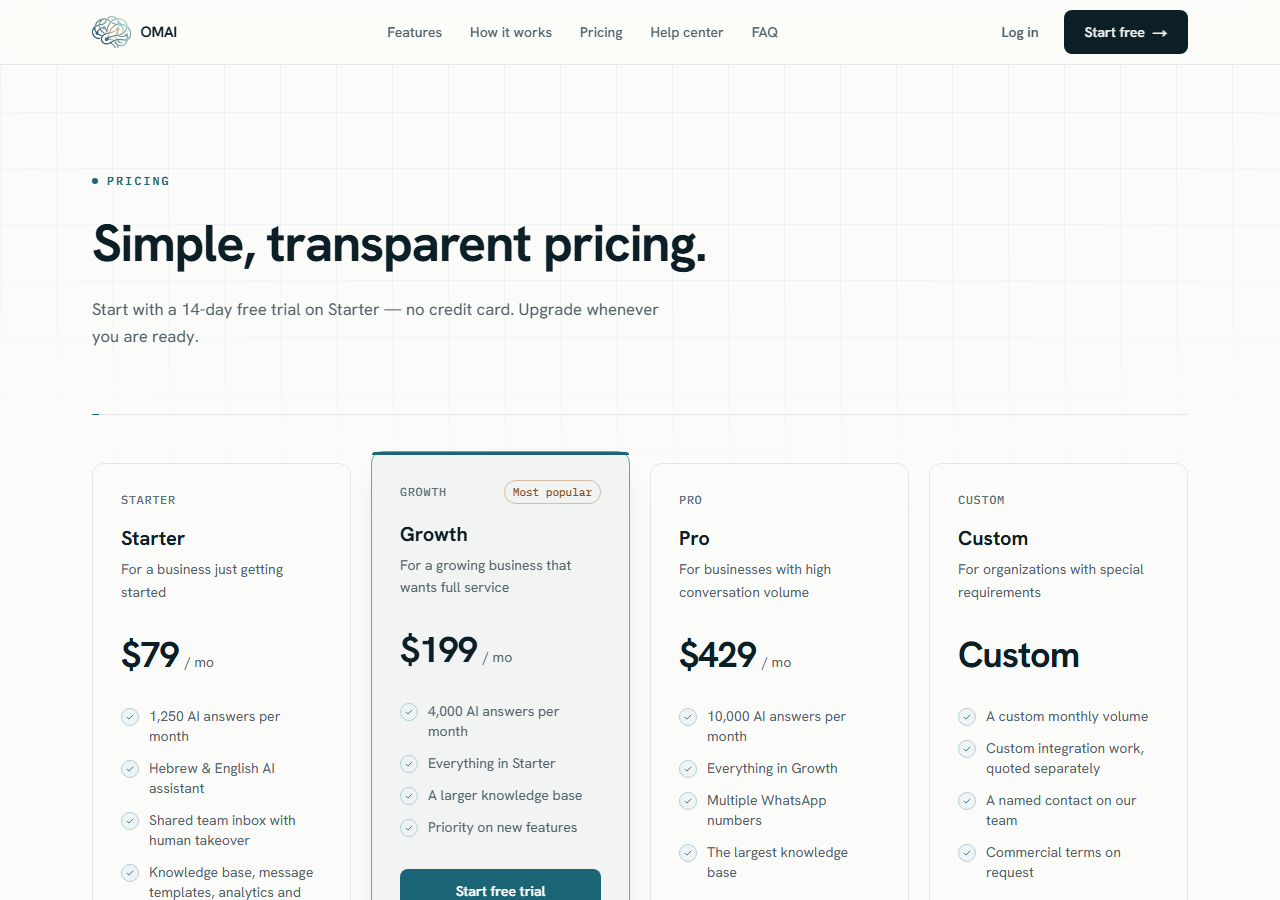
The plans OMAI sells, side by side: monthly price, the AI answers included, team members, knowledge storage and what happens when an allowance runs out.
- Who
- Anyone choosing or managing a plan
- Plan
- All plans
- Role
- Any signed-in member can view plans; Owner or Admin to switch
Before you start
- An OMAI account, to see the plan cards in the dashboard
OMAI sells three monthly plans — Starter, Growth and Pro — plus a Custom plan that is quoted per contract. They differ mainly in one number: how many AI answers your assistant may send in a month. Team members, knowledge storage and the WhatsApp numbers you can run scale alongside it.
The plans
| Plan | Israel (before VAT) | International | AI answers included |
|---|---|---|---|
| Starter | ₪199 / month (₪234.82 incl. VAT) | $79 · €75 | 1,250 |
| Growth | ₪549 / month (₪647.82 incl. VAT) | $199 · €189 | 4,000 |
| Pro | ₪1,199 / month (₪1,414.82 incl. VAT) | $429 · €399 | 10,000 |
| Custom | Quoted | — | Agreed per contract |
| Plan | When the allowance runs out | Team members | Knowledge storage | Dedicated numbers you can buy |
|---|---|---|---|---|
| Starter | Answering stops at 1,250 | 2 | 125 MB | 1 |
| Growth | Fair use to 6,000, then answering stops | 5 | 400 MB | 1 |
| Pro | Fair use to 15,000, then answering stops | 15 | 1,250 MB | 3 |
| Custom | Agreed per contract | 100 | 10,000 MB | 10 |
What the numbers mean
AI answers
One AI answer is one reply your assistant sends to a customer on WhatsApp that the messaging provider accepted — at most one per incoming customer message. Messages your team writes by hand, incoming customer messages and messages you send in the test simulator are not counted. What counts as an AI answer covers the definition in full.
Fair use, and where answering stops
Starter stops at exactly its included amount: at 1,250 answers in a billing period the assistant stops answering. Growth and Pro keep answering past the included amount, up to half as much again — 6,000 on Growth and 15,000 on Pro — and stop there. Answers in that fair-use band carry no per-answer charge; the plan price is the plan price.
The billing page shows the exact stopping point for your plan in the Answers before service pauses tile. When answering stops, incoming customer messages still arrive and are stored, and the conversation is handed to your team in the inbox.
Team members
The seat count is how many people can belong to your organization at once, counting the owner. Starter includes 2, Growth 5, Pro 15 and Custom 100. The limit is checked when you invite or accept a member — over the limit, the invitation is refused with a message that the seat limit has been reached. See inviting your team.
Knowledge storage
Knowledge storage is the total size of the documents you upload to the knowledge base: 125 MB on Starter, 400 MB on Growth, 1,250 MB on Pro and 10,000 MB on Custom. An upload that would take you past the allowance is refused before it is stored. Nothing already uploaded is removed when you move to a smaller plan — being over a limit only blocks new uploads. See uploading documents.
WhatsApp numbers
Starter and Growth run one connected WhatsApp number. Pro and Custom include the multiple-numbers entitlement, so you can connect more than one. Separately, you can buy a dedicated number through OMAI — 1 on Starter and Growth, 3 on Pro, 10 on Custom. A purchased number is an add-on billed on top of the plan price, and the billing page adds the two into one monthly total under Add-ons. See buying a number.
Price, VAT and Meta’s fees
Israeli prices are shown before VAT (18%). The VAT-inclusive total — ₪234.82 for Starter, ₪647.82 for Growth or ₪1,414.82 for Pro — is the amount debited, and the checkout page shows the subtotal, an 18% VAT line and the Total charged today before you confirm. The invoice you receive splits the same total into net and VAT.
Every plan is billed monthly. There is no annual billing interval, and no per-answer billing above the plan allowance — the way to get more answers is to move to a larger plan.
See and change your plan
Step 1 Open Billing in the dashboard sidebar.
You should see: The Billing & plan page opens, with Your current plan, Subscription status and Answers before service pauses across the top.
Step 2 Scroll to Available plans.
- Custom is not offered here. It is arranged by contract — write to us for a quote.
You should see: Each card shows the monthly price, the AI answers per month, the knowledge base size in MB and the seat count. Your own plan is marked Current plan and its button reads Active plan.
Step 3 Choose Switch to this plan on the plan you want.
- Only an Owner or an Admin can complete this. Viewers and Agents can open the page, but the checkout will not go through for them.
- Switching charges the new plan’s full monthly price immediately — read changing your plan before you switch.
You should see: The checkout page Almost there opens with the amount and the billing details to confirm.
Can I pay for a year in advance?
No. Every plan in the catalog is billed on a monthly interval, and the dashboard offers no annual option.
If prices change, does my price change?
Your subscription keeps the plan version it was bought under, and renewals are charged against that version. A catalog change applies to you when you switch plans, not before.
What happens to my data if I move to a smaller plan?
Nothing is deleted. Team members, uploaded documents and purchased numbers you already have stay as they are; the smaller limits apply to new invitations, new uploads and new purchases.
Where do I see what I have used so far?
On the Billing & plan page, in the Usage this period card. It shows an AI answers meter and a Knowledge base (MB) meter for the current billing period.